Private On-Premises Infrastructure with Raspberry Pi
Building your own on-premises infrastructure gives you complete control over your compute resources without recurring cloud costs. Whether you're running personal projects, development environments, or simply learning infrastructure concepts, a Raspberry Pi can serve as a powerful, energy-efficient compute platform that won't break the bank.
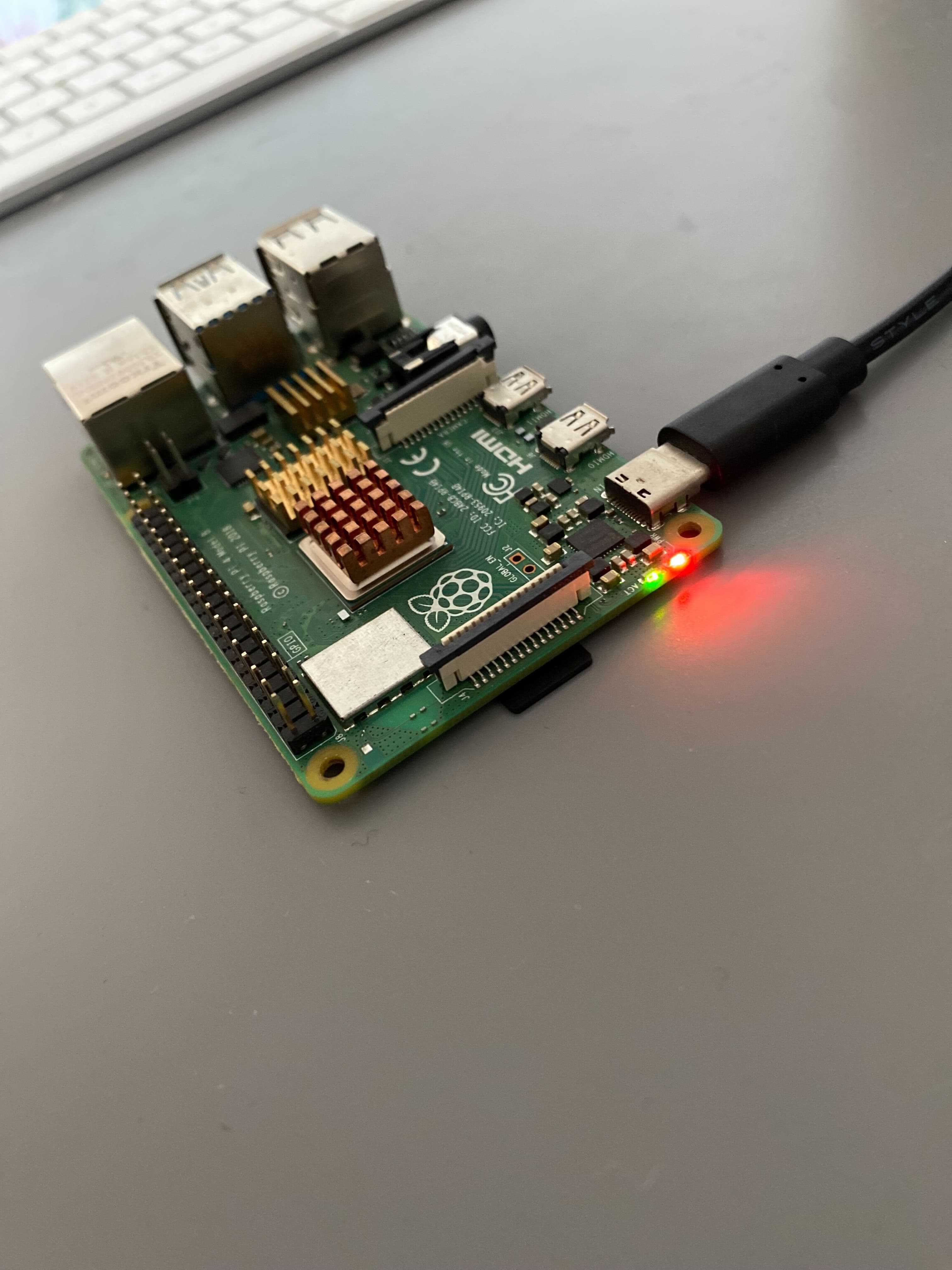
In this guide, we'll walk through setting up a working Raspberry Pi infrastructure from scratch - from flashing the OS all the way to deploying containerized applications with automated CI/CD pipelines. Think of it as your personal cloud, but one that sits on your desk and costs almost nothing to run.
What you'll build
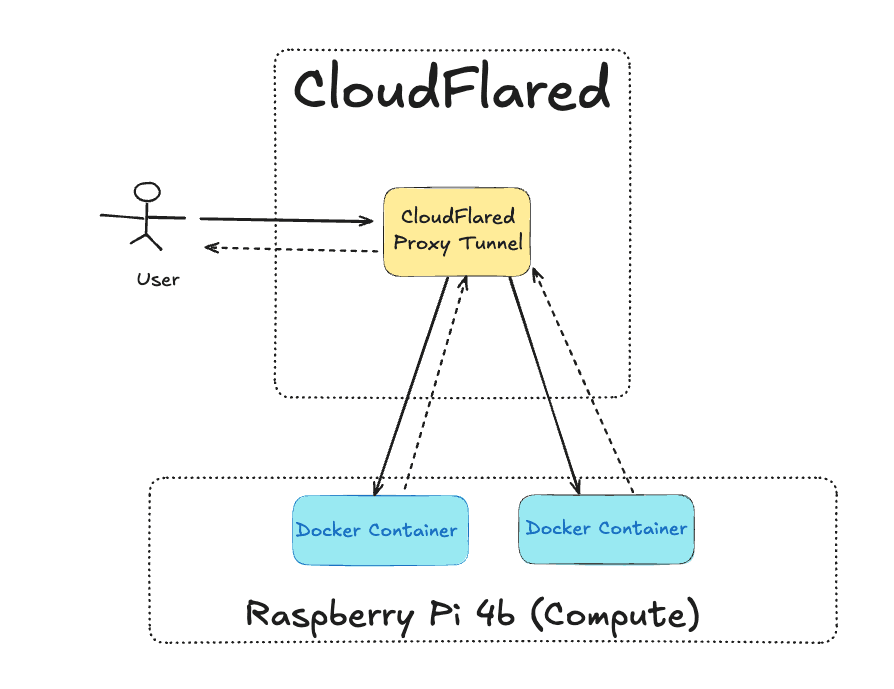
We're going to build a complete on-premises infrastructure setup featuring:
- Raspberry Pi as Compute: Headless Raspberry Pi running OS Lite with SSH access
- Automated Configuration: Ansible playbooks for reproducible system setup (so you never have to manually configure a Pi again!)
- Self-Hosted CI/CD: GitHub Actions runner running directly on your Pi
- Public Access: Cloudflare tunnel for secure internet exposure without port forwarding
- Continuous Deployment: Automated Docker image builds and deployments on ARM64 architecture
By the end of this guide, you'll have a Raspberry Pi that:
- Automatically builds and deploys Docker containers on every git push
- Is securely accessible from anywhere via HTTPS
- Costs only the electricity to run it (we're talking ~$2-5/year here!)
Code Repository
All the Ansible playbooks, configuration files, and example code from this tutorial are available in the GitHub repository:
https://github.com/IaC-Toolbox/iac-toolbox-raspberrypi
Feel free to clone it and follow along! Each section of this tutorial corresponds to files in the repository.
Why On-Premises?
Let me share why this approach makes sense for many projects:
Cost-Effective: A Raspberry Pi 4B costs around $50-80 one-time, with minimal electricity costs (~$2-5/year). Compare this to cloud compute which can easily run $15-50+ per month. The Pi pays for itself in just a few months!
Full Control: You own the hardware, your data, and your infrastructure. No vendor lock-in, no surprise billing at the end of the month, and no one throttling your resources.
Learning Platform: Perfect for understanding infrastructure concepts without worrying about cloud costs during experimentation. Want to break something? Go ahead - it's your hardware!
ARM64 Development: Ideal for building and testing ARM64 applications, which are increasingly common in edge computing and mobile devices. You're building on the same architecture that powers billions of devices.
What This Tutorial Is Not
Before we dive in, let's be clear about what this tutorial is NOT. This is not a guide for enterprise production infrastructure. We won't cover high availability, load balancing, or disaster recovery. The goal here is to build a functional, cost-effective personal infrastructure that you can expand upon as your needs grow.
Prerequisites
Before starting, you'll need a few things:
- Raspberry Pi 4B (4GB or 8GB RAM recommended)
- MicroSD card (32GB or larger, Class 10)
- Power supply for Raspberry Pi
- WiFi network or Ethernet connection
- Mac or Linux machine for running Ansible (this can be your laptop)
- GitHub account for CI/CD setup
- Domain name (optional, for Cloudflare tunnel)
Table of Contents
This tutorial series is organized into the following guides:
- Hardware Requirements - Essential hardware components needed for your Raspberry Pi setup
- Raspberry Pi OS Setup - Install and configure Raspberry Pi OS Lite for headless operation
- Ansible Base Software Setup - Automate configuration with Ansible playbooks for Docker and system packages
- Configure Cloudflare Tunnel - Set up secure public access without port forwarding
- Configure GitHub Runner - Install self-hosted GitHub Actions runner for ARM64 CI/CD
- Docker Build Deployment - Implement automated Docker image builds and deployments
- Managing Secrets - Securely manage secrets and credentials for your infrastructure
- Managing Secrets with Vault - Deploy HashiCorp Vault for centralized secrets management
- Grafana Setup - Set up Grafana for monitoring and observability dashboards
- Prometheus Metrics Setup - Configure Prometheus for hardware and system metrics
- Logs with Loki - Implement centralized logging with Grafana Loki
- Grafana Alerts - Configure alerting rules for proactive monitoring
- Grafana PagerDuty Integration - Integrate PagerDuty for incident management
- Conclusion - Summary and next steps for expanding your infrastructure
Each section builds upon the previous one, creating a complete infrastructure setup you can adapt for your own projects. Think of it as building with LEGO blocks - each piece connects to the next until you have something amazing.
Let's dive in! First, we'll cover what hardware you need to get started.
Next: Hardware Requirements