Running an AI Coding Bot on Raspberry Pi - Complete Guide
After setting up my Raspberry Pi with complete observability, secrets management, and CI/CD pipelines, I realized I had built the perfect platform for something more ambitious: an autonomous AI coding assistant that could work while I sleep.
This guide documents my journey building a self-hosted AI coding bot that:
- Runs entirely on a Raspberry Pi (no cloud costs)
- Delegates work to specialized AI agents (OpenClaw + Codex)
- Maintains its own knowledge base (Obsidian vault)
- Generates its own work queue from business roadmaps
- Works autonomously 24/7 without human intervention
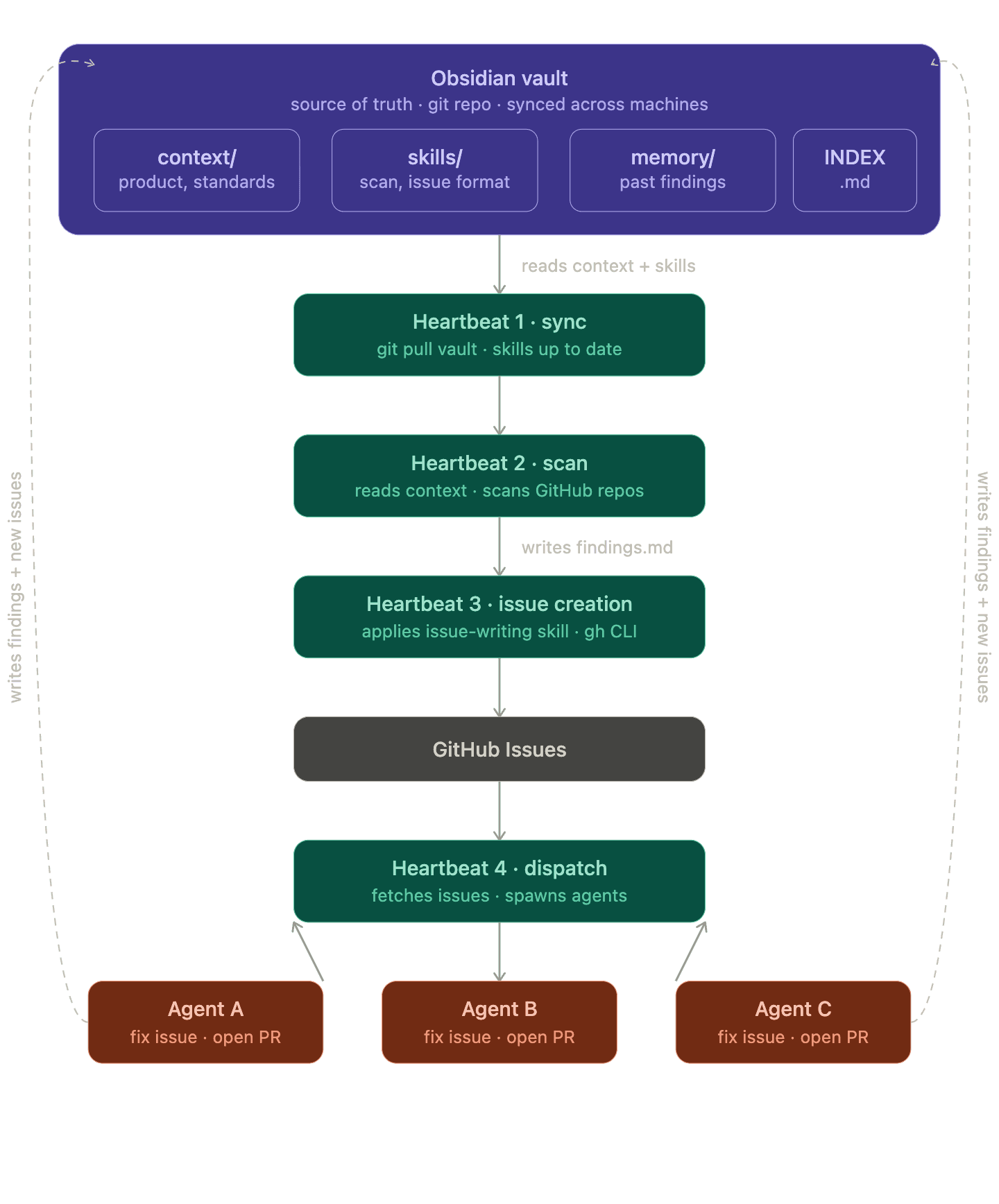
What You'll Build
By the end of this series, you'll have an AI coding system that:
- Reads your product roadmap written in plain Markdown
- Generates GitHub issues from business requirements
- Picks up issues automatically and delegates to Codex for implementation
- Writes, tests, and commits code with full validation
- Opens pull requests and notifies you on Discord
- Stores findings in an Obsidian vault as institutional memory
The entire system runs on a single Raspberry Pi 4B, costs pennies per month in electricity, and operates completely under your control.
Why This Matters
Most AI coding assistants are:
- Cloud-dependent - require internet, subscriptions, and trust in third parties
- Interactive - need you to give them every instruction
- Stateless - forget everything between sessions
- Expensive - $20-50/month per developer
This system is:
- Self-hosted - runs on your hardware, your network, your rules
- Autonomous - generates its own work from your roadmap
- Persistent - builds institutional knowledge in Obsidian
- Cost-effective - $2-5/year in electricity after initial hardware cost
Table of Contents
This tutorial series is organized into six parts:
- Secure Setup - Security-first configuration: Docker isolation, fine-grained GitHub PATs, and Anthropic spending caps
- Installing OpenClaw - Node.js setup, OpenClaw installation, Discord integration, and resolving dependency issues
- Performance & Stability - Expanding swap, tuning memory, systemd service setup, and log routing to Grafana
- Codex Delegation - Setting up OpenClaw as coordinator, ACP configuration, tmux sessions, and the mailbox protocol
- Heartbeats & Notifications - Wake triggers, completion signals, HEARTBEAT.md registry, and parallel agent spawning
- Obsidian & Autonomous Loop - Obsidian vault as second brain, roadmap parsing, automatic issue creation, and the full autonomous loop
Prerequisites
Before starting, you should have:
- Raspberry Pi 4B (4GB or 8GB RAM) with Raspberry Pi OS
- Docker installed and configured
- GitHub account with repository access
- Anthropic API key for Claude access
- Discord account for bot interaction
- Basic command line familiarity (SSH, tmux, systemd)
If you don't have the basic Pi infrastructure set up yet, check out my Private On-Premises Infrastructure guide which covers the foundation:
- Raspberry Pi OS setup
- Docker configuration
- Grafana + Prometheus + Loki observability stack
- HashiCorp Vault for secrets management
What This Series Is Not
This is not a guide for enterprise production AI systems. We won't cover:
- Multi-tenant isolation
- High availability or load balancing
- Compliance or audit logging
- Enterprise identity management
This is a guide for:
- Personal development infrastructure
- Learning AI agent orchestration
- Cost-effective experimentation
- Understanding autonomous AI systems
The Philosophy
The core insight is separation of concerns:
- OpenClaw = Coordinator and interface (Discord, HTTP, dashboard)
- Codex = Specialist worker for coding tasks
- Obsidian = Persistent memory and knowledge base
- GitHub = Source of truth for code and tasks
Each component does one thing well, and they communicate through simple, inspectable interfaces (files, HTTP, Discord messages).
Cost Breakdown
One-time hardware:
- Raspberry Pi 4B (8GB): ~$75
- MicroSD card (64GB): ~$12
- Power supply: ~$10
- Case (optional): ~$8
- Total: ~$105
Recurring costs:
- Electricity (~5W): ~$2-5/year
- Anthropic API: Pay only for tokens used
- **Total: $10/year **
Compare this to cloud-hosted AI assistants at $240-600/year and you break even in 2-4 months.
Code Repository
All configuration files, scripts, and examples from this series are available in the GitHub repository:
https://github.com/IaC-Toolbox/iac-toolbox-raspberrypi
The OpenClaw-specific configurations are in the openclaw/ directory.
Let's Begin
Ready to build your own autonomous coding assistant? Start with Part 1: Secure Setup where we lay the security foundation before installing anything.
The series is designed to be followed in order - each part builds on the previous one. By the end, you'll have a fully autonomous AI coding system running on hardware you control.
Next: Part 1 - Secure Setup