Running an AI Coding Bot on Raspberry Pi — Part 6 Obsidian Vault & Autonomous Roadmap Loop
Previous: Part 5 - Heartbeats & Notifications
By this point OpenClaw can take instructions, spawn Codex, write code, and open PRs. But I'm still the one generating every task. The final evolution is to give the agent a place to store findings and a way to read my product roadmap directly — so it can generate its own work queue from business intent I write in plain markdown.
The second brain concept
What many call a second brain — an Obsidian vault integration with OpenClaw is a powerful addition because it provides a markdown store (also known as a scratchpad). It is powerful because now our agent has freedom to store its findings somewhere. It becomes a source of truth, not only of the findings but also of the business context — I can write to Obsidian notes and the agent has access to it.
The system I had in mind:
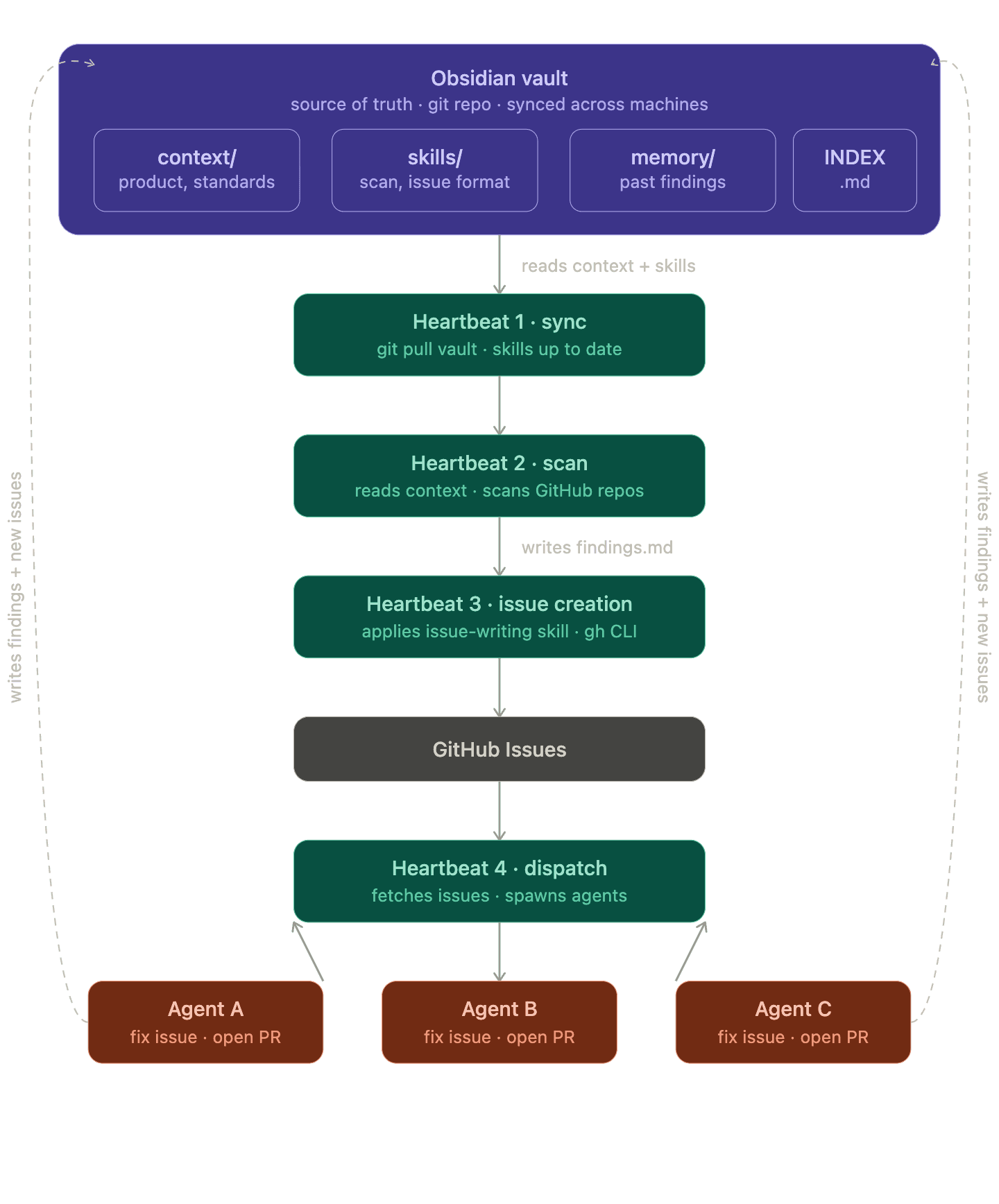
The agent reads business context, discovers work to do, creates GitHub issues, picks them up, writes code, and stores findings back in the vault. A closed loop.
Creating an Obsidian vault from the workspace
The most straightforward approach is to convert the current workspace into an Obsidian vault. This has several advantages:
- All the agent markdown files are version managed in GitHub
- They can be integrated with Obsidian App and modified from anywhere
cd ~/.openclaw/workspace
git init
git remote add origin https://github.com/IaC-Toolbox/openclaw-obsidian-workspace.git
mkdir .obsidian
echo "# My Brain" > README.md
git add . && git commit -m "init vault"
Then in Obsidian: Open folder as vault → point to that folder. Obsidian creates .obsidian/ config files automatically. Add .obsidian/ to .gitignore (it's local config) or commit it if you want settings synced.
The workspace structure
After setting up the vault, the full workspace structure:
workspace/
  INDEX.md                        ← read first, every session
  SOUL.md                         ← core identity and behavior
  USER.md                         ← user preferences and working style
  IDENTITY.md
  AGENTS.md
  TOOLS.md
  HEARTBEAT.md

  context/                        ← always load before any task
    iac-toolbox.md
    homelab.md
    roadmap/                      ← human-written roadmap items
      milestone-0-raspberrypi-cli.md
      milestone-0-raspberrypi-cli.metadata.json

  skills/                         ← load on demand, only what the task needs
    codex-orchestrated-dev/
    multi_agent_coordination/
    pr_refresh_and_conflict_resolution/
    documentation-with-diagrams/
    github-scan/
    issue-writing/
    ansible/

  memory/
    openclaw/                     ← agent writes findings here after each task
      YYYY-MM-DD-{repo}-{task}.md
    MEMORY.md                     ← long-term curated memory
The roadmap → metadata → issues pipeline
The key innovation is a sidecar JSON pattern. I write a plain markdown file describing what I want built. The agent reads it and extracts structured ticket metadata. That metadata drives issue creation.
The roadmap markdown (context/roadmap/milestone-0-raspberrypi-cli.md) is just plain text — a wishlist I wrote in 5 minutes. No special syntax.
The metadata sidecar (context/roadmap/milestone-0-raspberrypi-cli.metadata.json) is what the agent maintains:
{
  "roadmap_item": {
    "id": "milestone-slug",
    "title": "Human-readable title",
    "source_markdown": "milestone-file.md",
    "project_url": "https://github.com/orgs/IaC-Toolbox/projects/1",
    "status": "draft",
    "notes": "Each ticket entry represents a candidate issue derived from this roadmap milestone. Missing issue_number or repo_url means the ticket has not been created yet."
  },
  "tickets": [
    {
      "ticket_id": "stable-ticket-slug",
      "title": "Ticket title",
      "summary": "Short summary",
      "repo_url": "https://github.com/IaC-Toolbox/iac-toolbox-cli",
      "issue_number": null,
      "issue_url": null,
      "project_item_id": null,
      "status": "planned",
      "source_sections": ["Section heading"],
      "acceptance_hints": ["Hint 1", "Hint 2"]
    }
  ]
}
The interpretation rule: if issue_number is null, the issue hasn't been created yet. After creation, the agent updates the JSON in place with the issue number and URL.
The issue-writing skill
The issue-writing skill tells the agent how to go from roadmap text to structured metadata. The key responsibility:
- Read the roadmap markdown
- Read relevant product context from
context/ - Identify meaningful ticket candidates
- Infer the most appropriate repo from project architecture and feature description
- Write structured fields directly into the sidecar metadata JSON
- Only then create GitHub issues from the resulting metadata
This order matters — edit the metadata first, then create issues from it. The metadata is the source of truth, not ad-hoc issue creation.
context-to-issues.sh and publish-new-issues.sh
context-to-issues.sh is the script that reads the metadata and creates missing issues via the GitHub CLI. publish-new-issues.sh sends a Discord notification for each newly created issue:
📝 New issue created in IaC-Toolbox/iac-toolbox-cli: #9999
Test issue notification
This is a test message from publish-new-issues.sh
https://github.com/IaC-Toolbox/iac-toolbox-cli/issues/9999
Wiring it all into HEARTBEAT.md
The roadmap scanning task:
- name: roadmap-context-to-issues
  interval: 12h
  prompt_file: ~/.openclaw/workspace/heartbeat-prompts/roadmap-context-to-issues.md
The prompt file instructs the agent to:
- Read roadmap markdown and relevant context
- Use LLM judgment to identify tickets and infer repo assignment
- Update the sidecar metadata JSON directly
- Run
context-to-issues.shto create issues for actionable unticketed entries - Update metadata JSON with issue numbers after creation
- Notify the Discord channel for each newly created issue
- Reply
HEARTBEAT_OKif no new actionable issues are found
The sync-obsidian-vault heartbeat
For the vault to be useful it needs to stay current. Every time I add new notes from the Obsidian app on my laptop, the Pi needs to pull them:
- name: sync-obsidian-vault
  interval: 2m
  prompt: |
    Autonomous heartbeat: sync workspace from origin/main.
    cd ~/.openclaw/workspace && git pull origin main
    Reply HEARTBEAT_OK if successful with no notable changes. Alert only on failures or material changes to ongoing work.
The full autonomous loop
Putting it all together, the loop runs without me:
- I write a roadmap item in
context/roadmap/on my laptop in Obsidian - I push to git (or Obsidian sync does it)
sync-obsidian-vaultheartbeat pulls it to the Pi within 2 minutesroadmap-context-to-issuesheartbeat (every 12h) reads the roadmap, extracts tickets, creates GitHub issues- Discord notification fires for each new issue
project-autopickheartbeat (every 60m) scans for open unassigned issues and spawns agents- Agents write code, run validation, open PRs
check-agents.shfires on completion, sends me the PR links on Discord- Codex writes findings back to
memory/openclaw/ - Those findings can seed future roadmap items
The last step closes the loop entirely — the agent can notice things during implementation and add them to memory, which I can then convert into new roadmap items.
Token consumption
One thing to watch: the Obsidian vault approach has a real risk of loading too many tokens, since all the information lives in markdown files. The INDEX.md pattern helps — the agent reads that first every session and it tells it which files are relevant for the current task, avoiding loading everything.
For the heartbeat tasks especially, I scope them tightly:
"Run autonomous heartbeat: sync-obsidian-vault. Read only heartbeat-prompts/sync-obsidian-vault.md. Do not load INDEX.md, context/, or memory/ files. Reply HEARTBEAT_OK if nothing to report."The explicit "do not load" instructions matter — without them the agent will pull in the full context on every heartbeat tick.
Claude Code migration note
Claude Code has a built-in .claude/scheduled_tasks.json that can replace the OpenClaw heartbeat system if you switch frontends. The same heartbeat prompts can be reused there with minimal changes.
What we've built across this series
Looking back at the six posts:
- Security model that prevents the bot from causing real damage
- OpenClaw installed and talking on Discord
- Stable on Pi hardware with proper logging
- Codex doing the actual coding work in tmux with git worktrees
- Notifications firing automatically when work completes
- Autonomous loop from product vision to code to PR
It started as a neat device that does nothing. Now it's a system where I write what I want in plain markdown and wake up to PRs.
Previous: Part 5 - Heartbeats & Notifications