Running an AI Coding Bot on Raspberry Pi — Part 3 Performance & Stability
Previous: Part 2 - Installing OpenClaw
After a couple of hours of use, my OpenClaw stopped responding on Discord without any warning. No error, no notification — just silence. This post is about fixing the two main failure modes I ran into: the Pi running out of swap memory, and the bot process dying with no logs to debug it.
The SWAP problem
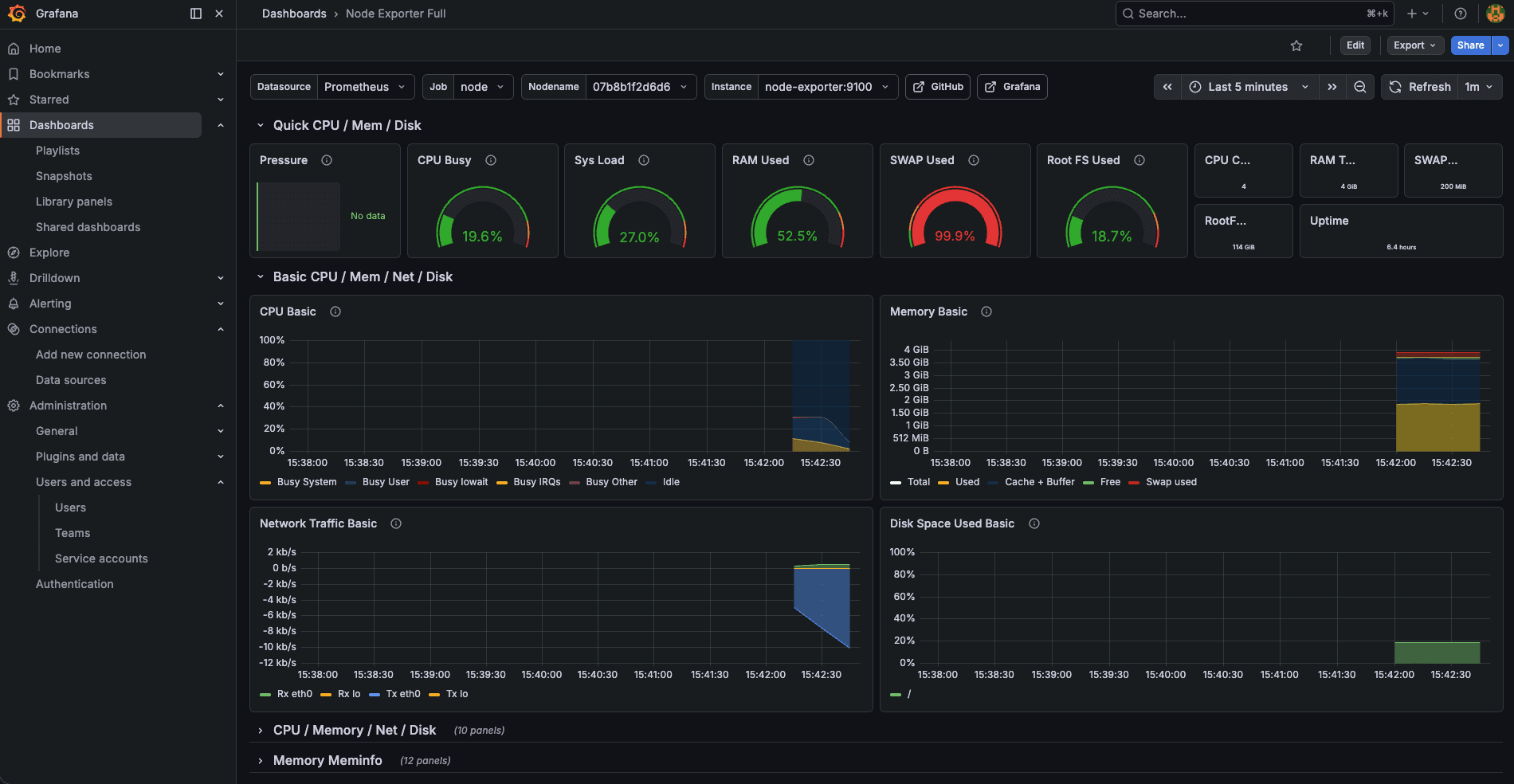
From Grafana, I could see SWAP usage sitting at 99.9%. With 4GB RAM, my Pi was heavily memory-pressured — everything in RAM was actively needed, and it was spilling everything else to disk. This causes significant slowdowns, and eventually the OOM killer starts taking things down.
What swap is
Swap is virtual memory on disk — when the Pi runs out of physical RAM, the OS moves less-used memory pages to a swap file on the SD card/SSD to free up real RAM. It's much slower than RAM but prevents out-of-memory crashes.
Checking current swap
vvasylkovskyi@raspberry-4b:~ $ swapon --show
NAME      TYPE SIZE   USED PRIO
/var/swap file 200M 199.8M   -2
Raspberry Pi OS allocates 200MB of swap by default. That's nowhere near enough when you're running an LLM gateway, a Discord client, and a browser control server simultaneously.
Allocating 2GB of swap
sudo fallocate -l 2G /swapfile
sudo chmod 600 /swapfile
sudo mkswap /swapfile
sudo swapon /swapfile
echo '/swapfile none swap sw 0 0' | sudo tee -a /etc/fstab

# Reduce swappiness for low-RAM devices
echo 'vm.swappiness=10' | sudo tee -a /etc/sysctl.conf
sudo sysctl -p
What each command does:
sudo fallocate -l 2G /swapfile— allocates a 2GB file on disk instantly. This becomes your swap space.sudo chmod 600 /swapfile— restricts the file to root-only read/write. Required by Linux —mkswapwill refuse to use a swap file that other users can read.sudo mkswap /swapfile— formats the file with swap metadata so the kernel knows it's a swap area.sudo swapon /swapfile— activates the swap file immediately for the current session.echo '/swapfile none swap sw 0 0' | sudo tee -a /etc/fstab— makes the swap persistent across reboots. Without this, the swap disappears on restart.echo 'vm.swappiness=10'— sets swappiness to 10 (default is 60). This tells the kernel to prefer keeping things in RAM and only spill to swap when really necessary. Important on a Pi because SD card I/O is slow and has limited write cycles.sudo sysctl -p— reloads/etc/sysctl.confto apply the swappiness change immediately without rebooting.
The swap priority problem
After applying the script, I had two swap files:
vvasylkovskyi@raspberry-4b:~ $ swapon --show
NAME      TYPE SIZE USED PRIO
/var/swap file 200M 200M   -2
/swapfile file   2G   0B   -3
The Pi was ignoring the big 2GB swapfile and hammering the tiny 200MB one. That's a priority problem — /var/swap has priority -2 (higher) and /swapfile has -3 (lower), so the system fills the small one first and never touches the big one.
Fix — disable the small one since the 2GB one is sufficient:
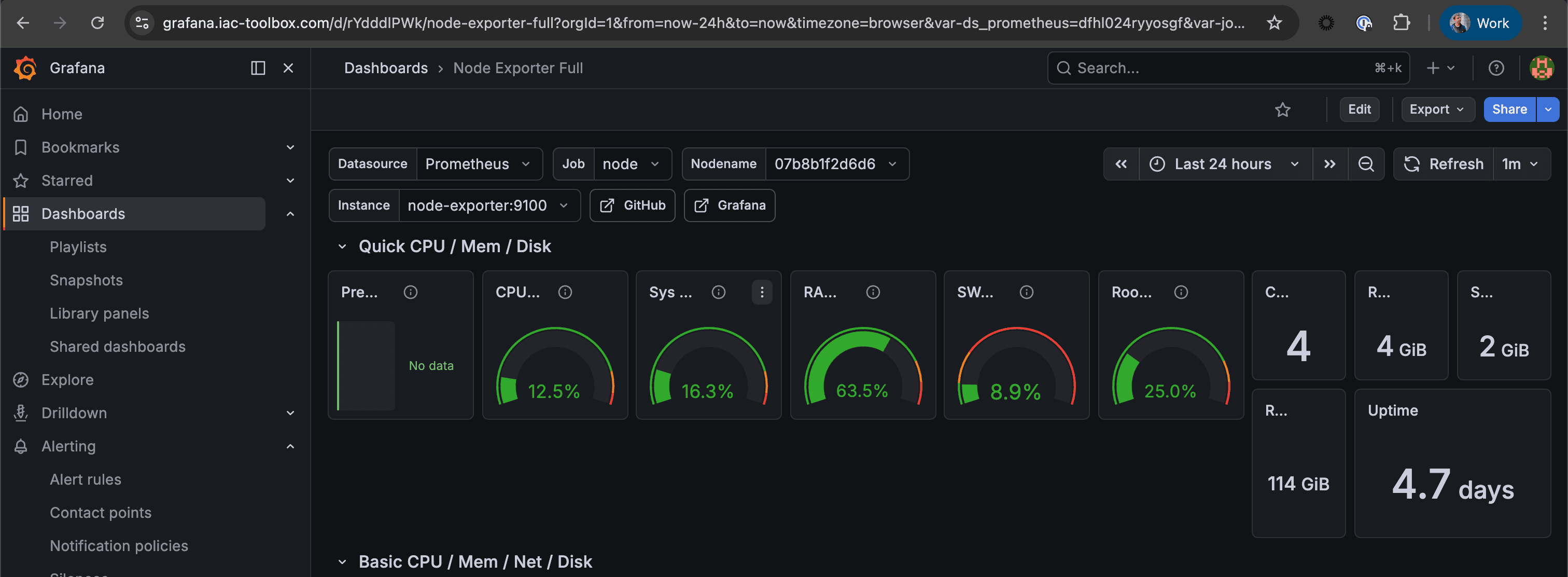
sudo swapoff /var/swapAfter expanding swap and fixing the priority, Grafana shows the improvement:
Increasing OpenClaw timeout
I was getting lots of timeouts especially when asking the bot to run commands on the device. The error in chat flow:
Request timed out before a response was generated. Please try again, or increase agents.defaults.timeoutSeconds in your config.Update it in the config:
sudo nano ~/.openclaw/openclaw.jsonFind agents.defaults.timeoutSeconds and increase it. Then restart the gateway to apply:
openclaw gateway stop
openclaw gateway > /dev/null 2>&1 &
Making the bot persistent — the silent death problem
After using it for a couple of hours, OpenClaw failed to respond on Discord. This raised two questions:
- What did we miss to make OpenClaw persistent and auto-restart?
- How do we react to a failure and get notified?
The DISCORD_BOT_TOKEN problem
This time it was my Discord bot token that got lost from the env variable after a session restart. Although not ideal from a security standpoint, I replaced the env var reference with the token stored as plaintext in ~/.openclaw/openclaw.json:
"channels": {
  "discord": {
    "enabled": true,
    "token": "YOUR_ACTUAL_DISCORD_BOT_TOKEN",
    ...
  }
}
This is a tradeoff — it's less clean than env vars, but it survives restarts. If you're security-conscious about this file, restrict its permissions.
Installing as a systemd service
To address both reliability and the lack of persistent logs, I built an automation that installs OpenClaw as a systemd service. With systemd managing the process:
- It auto-restarts on crash
- Logs go to the journal and can be forwarded to Grafana Loki
- You can check status with
systemctl --user status openclaw
The gateway service is actually already installed by --install-daemon during onboard:
systemctl --user status openclaw-gateway.service
● openclaw-gateway.service - OpenClaw Gateway (v2026.4.2)
     Loaded: loaded (/home/vvasylkovskyi/.config/systemd/user/openclaw-gateway.service; enabled; preset: enabled)
     Active: active (running) since Sun 2026-04-05 14:05:29 WEST; 23min ago
Routing logs to Grafana Loki
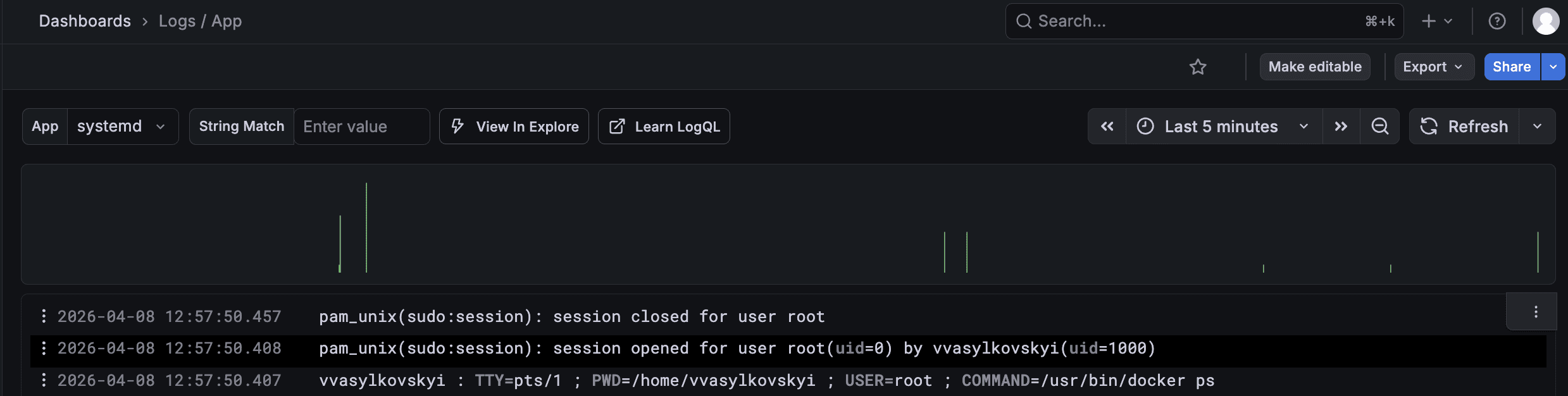
I have Grafana Loki configured with Grafana Alloy for log collection, and I can see my systemd logs in Grafana. This means two ways to pull logs from OpenClaw:
- Make it a systemd service (already done above)
- Run it inside a Docker container
The systemd route is easier — it avoids the potential of scoped Docker permissions limiting features. The Docker approach would be more secure if configured correctly, but for now systemd does the job.
With systemd + Loki, when the bot dies overnight I now have logs to debug it instead of just staring at silence.
Enabling elevated exec from Discord
When I tried to install something on the Pi via the bot, I hit this:
sudo apt-get update && sudo apt-get install -y ansible

elevated exec is unavailable in this Discord session
To enable this, add to your config:
{
  "tools": {
    "elevated": {
      "enabled": true,
      "allowFrom": {
        "discord": ["YOUR_DISCORD_USER_ID"]
      }
    }
  }
}
Or via CLI (ask your bot for your Discord user ID first):
openclaw config set tools.elevated.enabled true --strict-json
openclaw config set tools.elevated.allowFrom.discord '["YOUR_DISCORD_USER_ID"]' --strict-json
openclaw config validate
openclaw gateway restart
Then from Discord you can use:
/elevated on— elevated host exec, approvals still apply/elevated full— elevated host exec without exec approvals
Message streaming
One more quality of life improvement — by default the bot sends a full wall of text when it finishes. To see progress as it arrives:
openclaw config set channels.discord.streaming partial
openclaw gateway restart
Modes available: off (final reply only), partial (temp message edited as text arrives), block (chunked), progress (maps to partial on Discord).
Note: Discord edit-based streaming can hit rate limits, which is why it's off by default. For long tasks it's worth it though.
What's stable now
- 2GB swap with correct priority — no more memory pressure
- OpenClaw managed by systemd — auto-restarts on crash
- Logs forwarded to Grafana Loki — can debug failures after the fact
- Discord token persisted in config — survives restarts
- Elevated exec enabled — can run sudo commands from Discord
- Streaming enabled — can see progress on long tasks
The bot is now actually reliable. The next post gets into the interesting part — delegating coding work to Codex running as a separate agent process.
Previous: Part 2 - Installing OpenClaw | Next: Part 4 - Codex Delegation